AtomVM is a tiny portable virtual machine that allows BEAM code to run on microcontrollers with less than 500KB of RAM such as the ESP32.
Build your Mer image in few minutes (using MIC)
Creating a new image for a certain embedded device is a boring process that can take a lot of time. For some time I’ve been working with MIC that is a rather easy to use tool for image creation.
MIC allows you to create filesystem tarballs, partitioned raw images, live CD images, etc… and you can create your ready to use Plasma Workspace image 😉
What you need: Mer SDK
How to create the image:
First of all you need to write your KickStart (.ks) file (you can also generate it using a yaml file). A KS file includes the list of repositories that are used to pull the packages, users, groups, misc settings, the list of packages (and patterns) that will be installed inside your image and some commands that are executed during image creation.
Here is an example of KS file:
lang en_US.UTF-8

keyboard us

timezone --utc UTC

part / --size 3000 --ondisk sda --fstype=ext3

rootpw rootpassword

user --name myuser --groups audio,video --password meriscool
repo --name=mer-core --baseurl=http://releases.merproject.org/releases/latest/builds/i586/packages --save --debuginfo --source

repo --name=mer-tools --baseurl=http://repo.merproject.org/obs/mer-tools:/stable/latest_i586/ --save --debuginfo --source
%packages

@Mer Core

openssh-server

%end
%post

echo Hello > /hello

%end
%post --nochroot

#More commands

%end
OK, now you are ready to create your image!
mic create raw mykickstart.ks -o myoutput --record-pkgs=name --pkgmgr=zypp --arch=i686
You will get your Mer image in a couple of minutes. Your image will contain all the packages included in @Mer Core pattern and openssh-server. Anyway it will not be possible to boot your system: you need to use an adaptation to make it fully working. You can easily find community adaptations for several boards and devices including RaspberryPi and x86 PCs.
More resources:
Some updates (about me and my life)
It has been a long time since my last post on this blog.
I’ve been busy with a lot of cool stuff recently and I haven’t had time to write more posts.
In the meantime my life changed a lot during last year, so I will spend few words on what happened.
At the end of September we launched the MISSUS experiment on BEXUS stratospheric baloon, it has been a success and it was really cool.
Few hours of experiment have took me hundreds of hours of work but it has been worth of it.
After the launch of MISSUS experiment I’ve started to spend most of my time with Ispirata, the company which I’m working for. Some days I’ve been working more than 8 hours day, but I really like what I’m doing because we are developing fresh and cool technologies. One of these projects is Hemera, a distribution for embedded devices based on Mer.
Part of my work on Hemera at Ispirata is also to contribute to Mer Project.
Unfortunately I don’t have a lot of time to contribute to KDE Plasma but I plan to find some spare time for it too, anyway part of my work is going to improve Plasma Active which runs on Mer, so part of my work is going to improve a KDE project 😉
So this has been my life during last year, I think I will post more further details soon about what I’ve been doing.
My GSoC Project: Port Plasma Calendar and other widgets to QML
This year I’ve been accepted as a Google Summer of Code student. My project goal is to port some plasma widgets (luna, fifteen puzzle, timer, calculator and notes) and the calendar to QML.
This GSoC project is rather important for several reasons, including:
- QML will play an important role in Qt5
- Using QML will allow to switch easily to QML Scene Graph
- QML makes development and maintenance easier
- QML plasma widgets much less likely crash the plasma shell
I would like to underline that a plasma widget is ported when there are no regressions so no one will notice the difference (anyway I hope they will behave better).
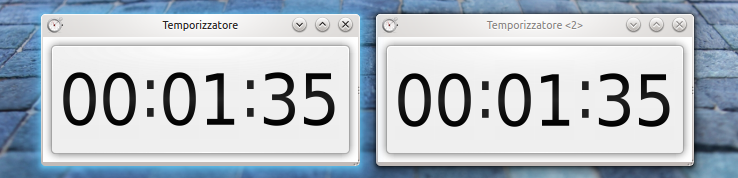
Timer widgets comparison (left: C++ version, right: QML version). Do you see any difference?
Current Status:
I’ve been working on this GSoC project for nearly a month now and the port of some widgets is almost complete (there are some missing pieces that needs to be addressed but I think they will be ready soon).
Anyway at the Akademy I will talk more about this GSoC project (Sat. 30 at 10.15/Room 2) 🙂
MISSUS experiment
During the last months my involvement in some projects has decreased, one of the reasons is that I’ve been working a lot on the MISSUS experiment. So I would like to blog about this interesting experiment.
MISSUS is an integrated sensors suite that will fly on a stratospheric balloon mission and will be launched on September from Esrange. My main task is to work on the on board software and on the ground segment software. The on board system is a PC104 board that runs Linux while the ground segment system is a laptop running Linux and a Qt client application.
After the launch I will be working a lot on other projects again. Anyway in the meantime I will blog more about the MISSUS experiment.
Kubuntu 12.04 on ASUS EeePC 1025C
This netbook (and also the EeePC 1025CE) contains an Intel N2800 Atom processor (Cedar Trail) that it comes with a GMA3600 graphics processor. The processor is a 64 bit processor but the 64 bit instruction set has been disabled from the bios so you need to get a 32 bit distribution.
The GMA3600 is based (like the GMA500/Poulsbo) on PowerVR core so you need a recent kernel with the GMA3600 driver that is required if you want to use the right screen resolution (1024×600) on your netbook.
Unlikely other intel graphics processors this one has been badly supported by the linux kernel, but recently the support to this graphics processor has been added but you need to install a 3.4 kernel on your (K)ubuntu system if you want everything working without ugly workarounds. The graphics driver provided by the kernel doesn’t support 3D acceleration that anyway is not required if you want to have graphics effects. There are also some closed source drivers (with 3D acceleration) available but I didn’t tried them.
The GMA500/GMA3600 driver is not included by default on Ubuntu 3.4 kernel so I’ve built a kernel with that driver and Atom optimizations enabled. You can use it also on any other laptop with a GMA3600 graphics core.
(K)ubuntu installation:
If you want to install kubuntu on this netbook you need to do the following steps:
- Download a 32 bit version of Kubuntu (64 bits support has been disabled from the bios)
- Install Kubuntu
- Download linux-kernel-3.4.0-030400-generic_3.4.0-030400.201205210521_i386.tar
- Open a terminal and type:
- tar xf linux-kernel-3.4.0-030400-generic_3.4.0-030400.201205210521_i386.tar
- dpkg –install linux-image-3.4.0-030400-generic_3.4.0-030400.201205210521_i386.deb linux-headers-3.4.0-030400_3.4.0-030400.201205210521_all.deb linux-headers-3.4.0-030400-generic_3.4.0-030400.201205210521_i386.deb
- reboot your system
How to build an Ubuntu kernel with GMA500 support:
If you don’t like to use my kernel package you can build the kernel by yourself. You just need to read this howto, to get vanilla kernel, to download ubuntu patches and to enable CONFIG_DRM_GMA500 and CONFIG_DRM_GMA3600.
Suspend:
Suspension causes graphics corruption (and a reboot is needed after that).
Sound (EeePC 1025C specific):
You need to configure ALSA/Pulse audio to use always mono output for the internal speaker otherwise you’ll hear only one audio channel.
Wifi (EeePC 1025C specific):
Supported: you don’t need to install anything else.
Webcam (EeePC 1025C specific):
Supported: you don’t need to install anything else.
it’s time to get ready for Qt 5/KDE 5
While plans for Qt 5 have been announced a lot of KDE software still depends on deprecated libraries like Qt3Support and KDE3Support. Qt 5 will not include Qt3Support, so all the code that is using it has to be rewritten. This is a huge list of cpp/h files that are using Qt3Support and KDE3Support. We must fix this issue as soon as possible.
KDE on mobile phone #0 (building ofono)
Sadly KDE mobile phone stack hasn’t been accepted as google summer of code project (we had other 50 proposals with higher priority). Personally I don’t agree, so I plan to work on it anyway.
If you want to build a KDE mobile stack that is able to connect to GMS/UMTS/CDMA network you need to build ofono (or any other similar daemon) as first thing. You just need to download phonesim and ofono from here. Then you just have to build both with ./configure && make. If you want you can run both from source directory (but you’ll need to copy src/ofono.conf to /etc/dbus-1/system.d/ofono.conf).
Ofono configuration is rather simple, you just have to copy the following configuration in /usr/local/etc/ofono/phonesim.conf.
[phonesim]
Driver=phonesim
Address=127.0.0.1
Port=12345
Now you are ready to run phonesim and ofono.
Our mobile phone stack depends also on ofono-qt library.
We love fresh wallpapers :)
As usual we would like to see new wallpapers included in the next KDE SC release and we need your help. So a new wallpaper contest is started!
If you want to participate you must keep to 3 fundamental rules:
- you must be the author of the photograph, you must provide your full name and you have to state the license (lgpl v3 is better).
- entries must be at least 1920×1200 resolution and a copy of the photo in RAW format (if available) is apprecitated.
- you must send your photographs to davide.bettio@kdemail.net before the 13th of june with the word “WALLPAPER” in the subject
Your wallpapers will be evaluted by some of the KDE artists and the best wallpapers will be released with KDE SC 4.7.
git, wallpapers and kdeartworks
Moving artworks to git might be a bad idea: everytime you clone a git repository you are doing a copy of the whole repository including the history. For this reason if you plan to update frequently your artworks you should consider to keep your artworks on a svn server, so users are not forced to clone all the previous artworks.
For this reason workspace wallpapers (kdebase/workspace/wallpapers) and kdeartwork will not be moved to git. So don’t forget to continue to checkout artworks from SVN!
- You can get default base wallpapers from /trunk/KDE/kde-wallpapers/
- You can get kdeartwork from /trunk/KDE/kdeartwork/